
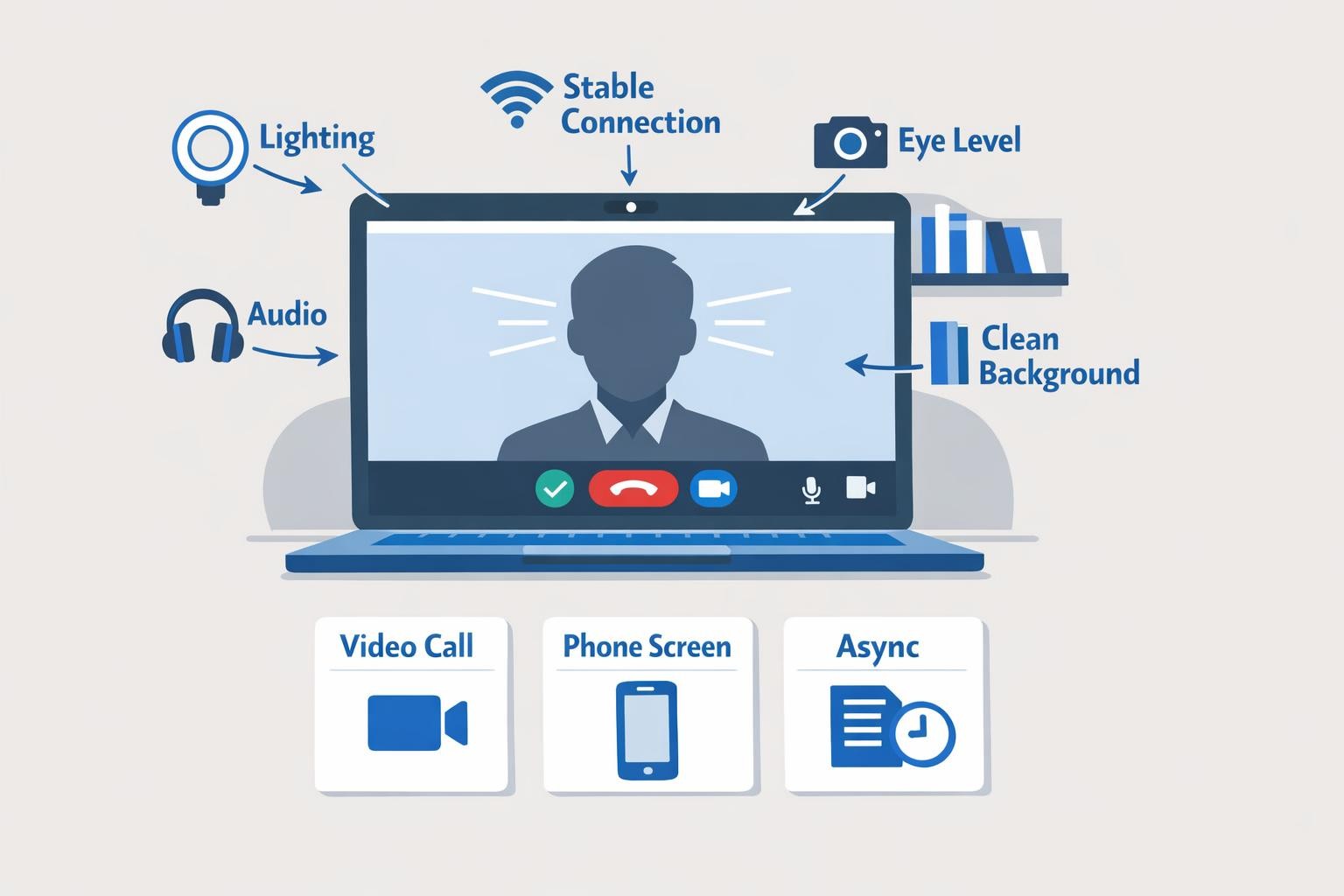
Remote job interviews test two things simultaneously: your qualifications for the role and your ability to communicate effectively through a screen. A candidate who gives brilliant answers but has a glitchy webcam, talks over the interviewer because of audio lag, or fumbles with screen sharing sends the same signal as someone who shows up to an in-person interview in wrinkled clothes. The medium is part of the message. Developing strong remote work skills is just as important as preparing your answers.
This guide covers every format of remote job interview you will encounter: live video calls, phone screens, and asynchronous assessments. For each format, you will find specific preparation steps, execution tactics, and common mistakes to avoid. The goal is to walk into every remote interview with the technical setup, communication skills, and content preparation to make your qualifications impossible to overlook.
Remote Video Interview Preparation
Video interviews are the most common format for remote hiring. They range from initial screens with recruiters to final-round panel interviews with senior leadership. The preparation is the same regardless of the stage.
Technical Setup
Your tech setup is the foundation. A poor connection or bad audio will undermine even the strongest interview performance.
- Internet connection. Use a wired ethernet connection if possible. If you must use Wi-Fi, position yourself close to your router, close bandwidth-heavy applications (cloud syncing, streaming, large downloads), and ask others in your household to limit their usage during your interview window. Run a speed test 30 minutes before the call: you need at least 10 Mbps upload and download for reliable video.
- Camera position. Your camera should be at eye level, not below your chin looking up (unflattering and signals you are on a laptop without a stand) and not above your head looking down (makes you appear small). Stack books under your laptop or use a laptop stand. If you use an external webcam, mount it on top of your monitor.
- Lighting. Face a window or place a lamp directly in front of you. Never sit with a window behind you, as it creates a silhouette effect. A simple ring light or desk lamp aimed at your face eliminates harsh shadows and makes you look professional on any camera.
- Audio. Use headphones with a built-in microphone. AirPods, earbuds, or a USB headset all work better than your laptop's built-in speakers and microphone, which pick up room echo and fan noise. Test your audio by recording a 30-second voice memo and playing it back. If you hear background noise, switch to a quieter room or use noise-canceling headphones.
- Software. Install and test the video platform (Zoom, Google Meet, Microsoft Teams) at least 24 hours before the interview. Update it. Test your camera and microphone in the app's settings. Know how to share your screen, use the chat function, and mute/unmute quickly.
- Backup plan. Have the interviewer's phone number or email ready. If your connection drops, immediately text or email: "My connection dropped. Rejoining now." If the problem persists, offer to switch to a phone call. Handling tech failures gracefully actually demonstrates the kind of problem-solving remote employers value.
Your Background
Your background communicates professionalism before you say a word.
- Clean and minimal. A plain wall, a bookshelf, or a tidy home office are all fine. Remove clutter, laundry, and anything you would not want a stranger to see.
- No virtual backgrounds. They cause visual artifacts, especially around hair and hand gestures. A slightly imperfect real background is better than a glitchy virtual one. If your space is genuinely unusable, use a slight blur effect instead.
- Consistent lighting across frames. If you use a bright lamp on one side and a dark wall on the other, the camera will struggle with exposure. Balanced lighting from the front eliminates this problem.
- Close your door. If you live with others, tell them your interview time and close the door. Brief interruptions happen and interviewers understand, but preventing them shows preparation.
Body Language on Video
Video flattens body language, which means you need to amplify the signals you want to send.
- Look at the camera, not the screen. When you are speaking, look at the camera lens. This creates the illusion of eye contact. When the interviewer is speaking, it is fine to look at the screen to read their expressions.
- Sit upright and lean slightly forward. This signals engagement. Slouching or leaning back reads as disinterest or arrogance on camera.
- Use hand gestures within the frame. Keep your hands visible at chest level and use natural gestures when making key points. Hands below the frame or behind your back make you look stiff.
- Nod and react visibly. In person, interviewers pick up on subtle nods and facial reactions. On video, those signals are harder to see. Nod more deliberately, smile when appropriate, and show active listening through your expressions.
- Manage your gaze. If you have notes, place them at the top of your screen near the camera so glancing at them does not look like you are looking away.
Phone Screen Strategies
Phone screens are typically the first human interaction in the hiring process. They last 20 to 45 minutes and are usually conducted by a recruiter or hiring manager.
Why Phone Screens Are Tricky
Without visual cues, phone calls amplify every awkward pause, verbal tic, and moment of hesitation. You cannot see the interviewer's face to know if your answer is landing. And the interviewer cannot see your confidence, preparation, or enthusiasm, so they rely entirely on your voice and your words.
How to Prepare
- Stand up during the call. Standing improves your vocal projection, energy, and breathing. If standing feels awkward, sit at the edge of your chair with your feet flat on the floor.
- Smile while speaking. This sounds like hollow advice, but it measurably changes your vocal tone. A genuine smile makes your voice warmer and more engaging. Phone interviewers can hear the difference.
- Prepare a one-page cheat sheet. Unlike video, where reading notes is obvious, phone screens give you the advantage of having reference material in front of you. Write down three to five key stories you want to tell, the company's recent news or product launches, and questions you want to ask. Prepare strong responses for common questions like tell me about yourself and why should we hire you.
- Eliminate background noise. Use a quiet room, close windows, and put your phone on Do Not Disturb. If you have a landline or reliable cell signal, use the highest-quality audio path available.
- Have a glass of water nearby. Dry mouth from nerves is common during phone calls. A quick sip during a natural pause keeps your voice clear.
Execution Tips
- Pace yourself. Phone conversations tend to rush because silence feels uncomfortable without visual cues. Slow down. Pause before answering to collect your thoughts. A two-second pause before a thoughtful answer is far better than a rapid, rambling one.
- Mirror the interviewer's energy. If they are upbeat and casual, match that tone. If they are formal and methodical, be precise and structured.
- Confirm understanding. Before answering complex questions, briefly paraphrase: "Just to make sure I understand, you are asking about..." This prevents wasted time on misinterpretation.
- End with specific enthusiasm. Your closing statement is the last impression. "I am excited about this role because [specific reason tied to what you discussed]" is far stronger than "this sounds like a great opportunity."
Free resource: Download our Interview Guide -- a step-by-step guide to acing your remote job interview with expert tips and preparation checklists.
Async Interview Formats
Asynchronous interviews are increasingly common in remote hiring, especially for distributed companies that operate across many time zones. Instead of a live conversation, you record your answers to pre-set questions, complete a written assessment, or submit a work sample on your own time.
One-Way Video Interviews
Platforms like HireVue, Spark Hire, and Willo present you with questions on screen and give you one to three minutes to record your response. You may or may not have time to prepare between questions.
How to succeed:
- Treat every recording as a live interview. Dress professionally, set up your lighting and camera as described above, and maintain eye contact with the camera.
- Practice with a timer. Record yourself answering common interview questions within the platform's time limit. Two minutes goes faster than you think. Get comfortable delivering complete, structured answers within that window.
- Structure your answers. Use a simple framework: context (one sentence), action (two to three sentences), result (one sentence). This keeps your answer focused and prevents rambling.
- Re-record when allowed. Most platforms give you the option to re-record. Use it. But do not chase perfection. A confident, slightly imperfect take is better than a stiff, over-polished fifth attempt.
Written Assessments
Some companies ask you to respond to scenario-based questions in writing, complete a case study, or write a memo.
How to succeed:
- Format matters. Use headings, bullet points, and short paragraphs. A well-structured response signals the written communication skills that remote companies prioritize.
- Follow instructions exactly. If they ask for 500 words, do not write 1,200. If they ask for three recommendations, give three, not five.
- Proofread twice. Written assessments are judged on quality of thought and quality of communication. Typos and grammatical errors undermine both.
- Show your reasoning. Do not just state conclusions. Walk through your logic so the reviewer understands how you think, not just what you think.
Take-Home Projects
These are small work samples: a code challenge for developers, a marketing plan for marketers, a design exercise for designers. They typically come with a deadline of three to seven days.
How to succeed:
- Clarify scope before starting. If the instructions are ambiguous, ask. Sending a quick email with a clarifying question shows initiative and prevents wasted work.
- Time-box your effort. Companies say "spend two to four hours" and they mean it. Going beyond that signals poor time management. Deliver a polished version of what you can accomplish within the stated timeframe.
- Include a README or cover note. Explain your approach, any trade-offs you made, and what you would do differently with more time. This context turns a good submission into a great one.
- Ship it early. Submitting before the deadline shows reliability. Submitting at 11:59 PM on the last day sends the opposite signal.
Remote Job Interview Preparation: What to Say
Technical setup and format mastery get you to the starting line. Your content is what wins the interview.
The Five Stories You Need
Prepare five detailed stories from your professional experience that you can adapt to different questions:
- A time you delivered results under pressure. This covers questions about handling stress and pressure, tight deadlines, and working independently.
- A time you worked effectively with a remote or distributed team. This directly addresses the employer's core concern: can you work well without being in the same room?
- A time you solved a complex problem. This covers analytical thinking, resourcefulness, and decision-making.
- A time you navigated a disagreement or difficult conversation. This covers interpersonal skills, conflict resolution, and communication maturity.
- A time you learned something quickly and applied it. This covers adaptability, growth mindset, and initiative.
For each story, know the situation (two sentences), your specific actions (three to four sentences), and the measurable result (one to two sentences). Practice telling each one in under two minutes.
Remote-Specific Questions to Prepare For
Beyond standard interview questions, remote employers will ask questions that test your readiness for distributed work:
- "How do you structure your workday?" Describe your actual routine: start time, how you prioritize tasks, when you take breaks, and how you wind down. Specificity signals experience.
- "How do you handle communication across time zones?" Reference specific tools and habits: async updates, documented decisions, overlap hour availability.
- "What does your home office setup look like?" Describe your workspace, equipment, and internet reliability. This question filters out candidates who plan to work from a couch with spotty Wi-Fi.
- "How do you stay motivated without in-person supervision?" Talk about intrinsic motivation, goal-setting habits, and accountability systems. Avoid claiming you "just love working" since that is not a system.
- "Why do you want to work remotely?" This is the remote version of why do you want to work here. Have a genuine answer that goes beyond "I hate commuting." Talk about how remote work enables your best output, gives you access to the best teams regardless of location, or aligns with how you work most effectively.
Follow-Up Tactics
How you follow up after a remote interview signals whether you understand professional communication in a distributed environment.
The Thank-You Email
Send a thank-you email within two to four hours of the interview. Not 24 hours. Two to four hours. Remote hiring moves fast, and decisions are often made before end of day.
Structure:
- Thank them for their time (one sentence).
- Reference something specific from the conversation that reinforced your interest (one to two sentences). This proves you were engaged and listening.
- Briefly reinforce your fit for one specific aspect of the role (one to two sentences).
- Close with forward momentum (one sentence): "I am looking forward to the next step."
Keep the entire email under 150 words. Do not attach your resume again. Do not restate your qualifications in full. The thank-you email is a signal, not a sales pitch.
After a Panel Interview
If you interviewed with multiple people, send individual thank-you emails to each interviewer. Reference a different point from your conversation with each person. This takes ten extra minutes and has an outsized impact because most candidates send one generic email to the group.
Following Up on a Decision
If the interviewer gave you a timeline ("we will be making a decision by Friday"), wait until the day after that deadline to follow up. If no timeline was given, follow up after five business days.
Keep your follow-up brief: "Hi [Name], I wanted to check in on the timeline for [Role Title]. I remain very interested in the position and would be happy to provide any additional information. Thank you."
One follow-up is professional. Two follow-ups (a week apart) are acceptable. Three is too many.
Remote Job Interview Mistakes That Kill Offers
Not testing your tech. "Sorry, can you hear me now?" in the first three minutes of an interview wastes time and signals that you do not prepare.
Multitasking. Interviewers can hear you typing. They can see your eyes scanning another screen. Even if you think you are being subtle, you are not.
Talking too long. Most interview answers should be 60 to 120 seconds. If you are past two minutes and have not reached the result of your story, you have lost the interviewer.
Generic enthusiasm. "I am really passionate about your company" with no specifics is worse than no enthusiasm at all. Reference specific products, recent company news, or team blog posts.
Not asking questions. "No, I think you covered everything" signals low interest. Prepare at least three thoughtful questions. The best questions reveal that you have already started thinking about how you would contribute to the team.
Ignoring the async component. If part of the process includes a written assessment or take-home project, that submission carries equal or greater weight than your live interview. Treat it accordingly.
Remote interviews reward the same thing remote work rewards: clear communication, thorough preparation, and the ability to perform well without someone watching over your shoulder. If you are transitioning from an office environment, our guide on moving from office to remote work covers the full shift. Master the format, prepare your content, and treat every interaction, from the first email to the final follow-up, as evidence that you belong on a distributed team.